
Agents can now place the order on your Shopify store, not just fill the cart
On September 28 Shopify extended WebMCP into checkout. An agent can read the checkout, change its fields and submit the order with buyer confirmation — with no merchant configuration, and no documented way to turn it off.
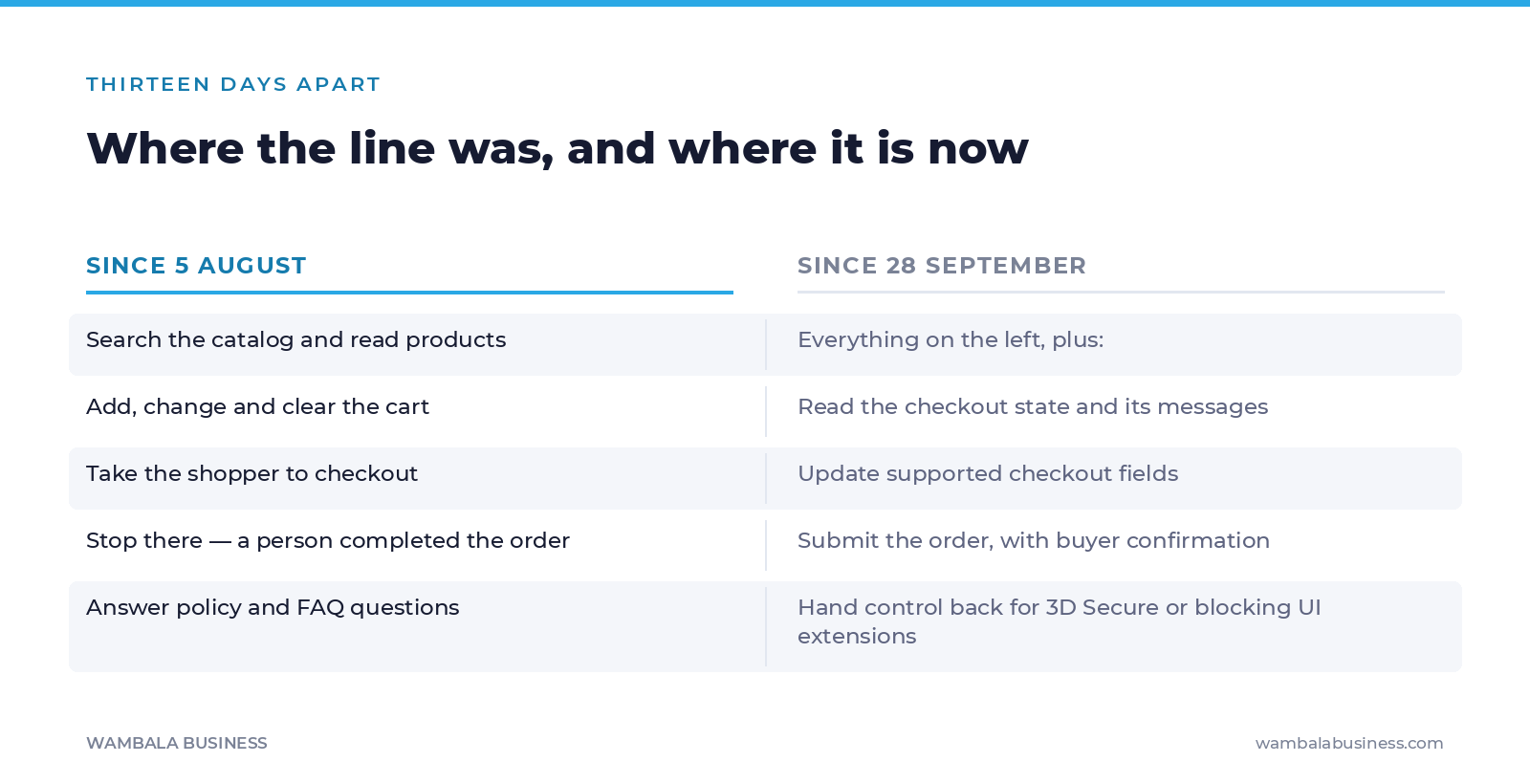
Two weeks ago we wrote that Shopify had made every storefront agent-callable, and we drew a line: an agent could search your catalog, fill the cart and take the shopper to checkout — and stop there, because a person completed the order.
On September 28, 2026, that line moved. Shopify extended WebMCP into checkout itself.
We are correcting our own article in public rather than letting it age quietly, because the part that changed is the part that matters.
What an agent can do inside checkout now
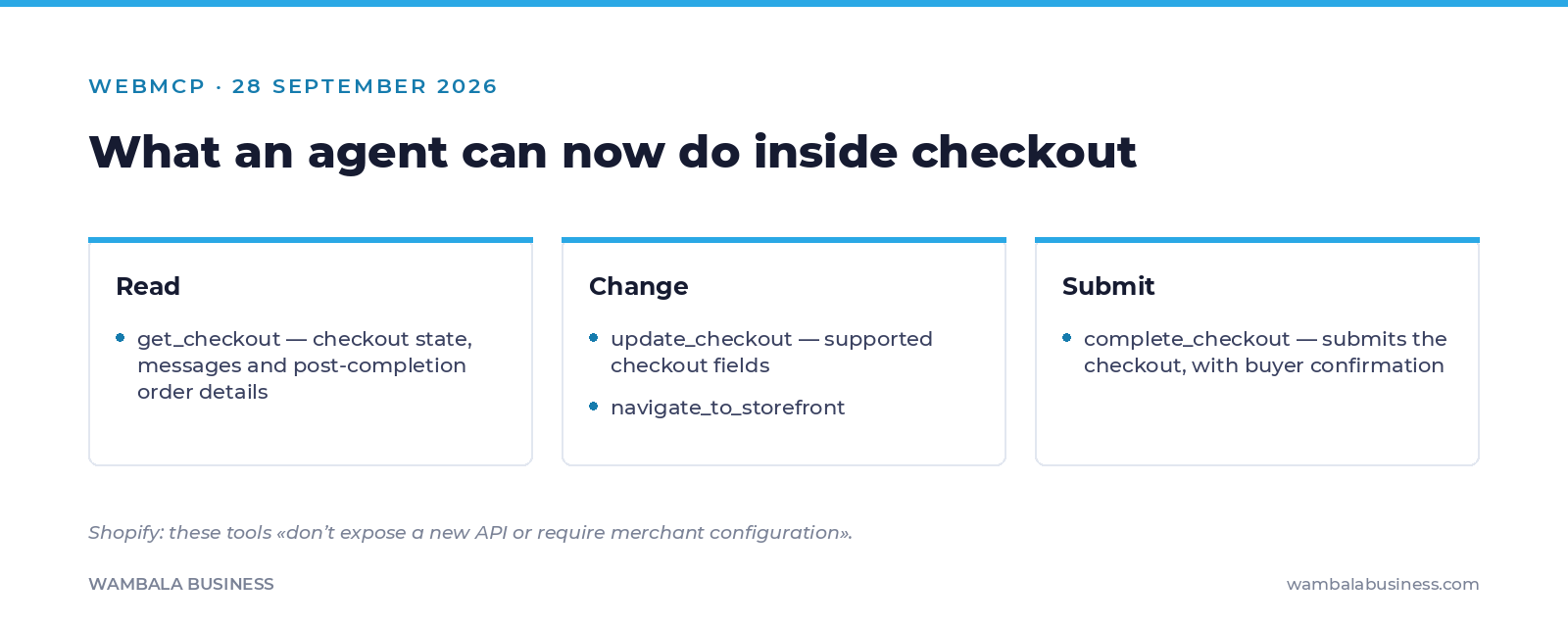
Shopify’s changelog is specific. get_checkout reads “checkout state, messages, and post-completion order details.” update_checkout updates “supported checkout fields.” complete_checkout submits the checkout. The tools work “inside checkout-web and use the same state as the checkout UI” — not screenshots, not scraping.
There are guardrails, and they are worth stating precisely rather than dismissing. Submission requires buyer confirmation, and the tools “hand back control to the buyer” when authorization is genuinely needed — specifically for 3D Secure authentication or blocking UI extensions.
How far the line moved, in 53 days
The pattern is the part to notice, not the feature. Both releases arrived the same way: on by default, across eligible stores, with — in Shopify's words — no new API and no merchant configuration required. We could not find a documented way to disable the checkout tools, and we are not going to tell you there isn't one; only that it is not in the changelog. If that matters to your business, ask Shopify directly and get the answer in writing.
What this actually changes for an operator
Three things, and none of them is “panic”.
Your checkout is now a machine interface. Every unnecessary field, every custom app that injects something into checkout, every validation that depends on a human reading an inline hint — all of that is now being traversed by software. A checkout that a person can struggle through is one a person completes anyway. An agent may simply fail, and nobody will tell you.
Your product data decides whether you are in the comparison at all. An agent that can complete a purchase still has to choose what to put in the cart. That choice is made on title, description, options, price and availability — the same catalog work we have been pointing at since agentic storefronts and WebMCP on the storefront.
Attribution gets worse before it gets better. An agent-completed order on your own storefront looks like an ordinary session in your reports. Combine that with the script tag freeze that takes effect today and you have two independent reasons for your numbers to drift from reality this quarter — one of them silent until March.
The test we would actually run
This is cheap and it tells you more than any article.
- Open your own checkout and count the fields. Anything you cannot justify to a stranger is a step an agent can trip on.
- List the apps that modify checkout. Shopify explicitly names “blocking UI extensions” as a thing that hands control back to the buyer. If one of yours blocks, agent-driven purchases stop there.
- Complete a real order on your store from a phone, start to finish. Not the settings page — the actual flow.
- Decide, deliberately, whether you want this. For most stores, an agent that completes a purchase is a sale you would not otherwise have made. For a few — high-touch, configurable, regulated products — it is a support problem arriving at speed. Either answer is defensible; not having an answer is not.
What nobody can tell you yet
There is no public data on how many real purchases are being completed this way. In-tab agents are weeks old. Anyone quoting you a conversion share is extrapolating from nothing.
We also cannot tell you how this interacts with your particular fraud rules, your subscription app, or your tax logic — those depend on your stack, and the honest answer is that it needs testing rather than predicting.
What is verifiable is the capability and the default. That is enough to go look at your own checkout this week, which is the only part of this you control.
If you want us to run that test with you, the first round of our technical audit is free. If you would rather have a checkout that works for people and machines alike, that is how we build Shopify stores and how we run Meta Ads on measurement we trust.
Verified October 1, 2026. Tool names, quotes and guardrails come from Shopify’s developer changelog.
Sources: Shopify — WebMCP support for checkout · TechCrunch — Shopify opens checkout to browser-based AI agents
Forty-eight hours, everything public about your brand, zero sales deck.
Leave your email and we will send you the report. We tell you what we find, whether or not it leads to hiring us.
The signup form needs marketing cookies, which you have not accepted yet. You can enable them from the cookie notice, or simply write to us: