
Shopify freezes script tags on October 1. Nothing breaks that day, and that is the problem
On October 1 Shopify blocks new script tags on every API version. Existing ones keep running until March 1, 2027 — which is exactly why most stores will not notice their tracking is on a deadline until it is gone.
There is a wave of urgent posts about Shopify blocking script tags on October 1, 2026. Most of them are technically right and practically misleading, because they skip the sentence that decides what you should actually do.
Here is Shopify’s own changelog, verbatim: on October 1, “scriptTagCreate and scriptTagUpdate will return an user error. Existing script tags will keep running.”
Nothing on your storefront stops working that day. The date that breaks things is March 1, 2027, when “Shopify will stop injecting script tags into storefronts.”
That five-month gap is where the real risk lives.
The two dates, and the gap between them
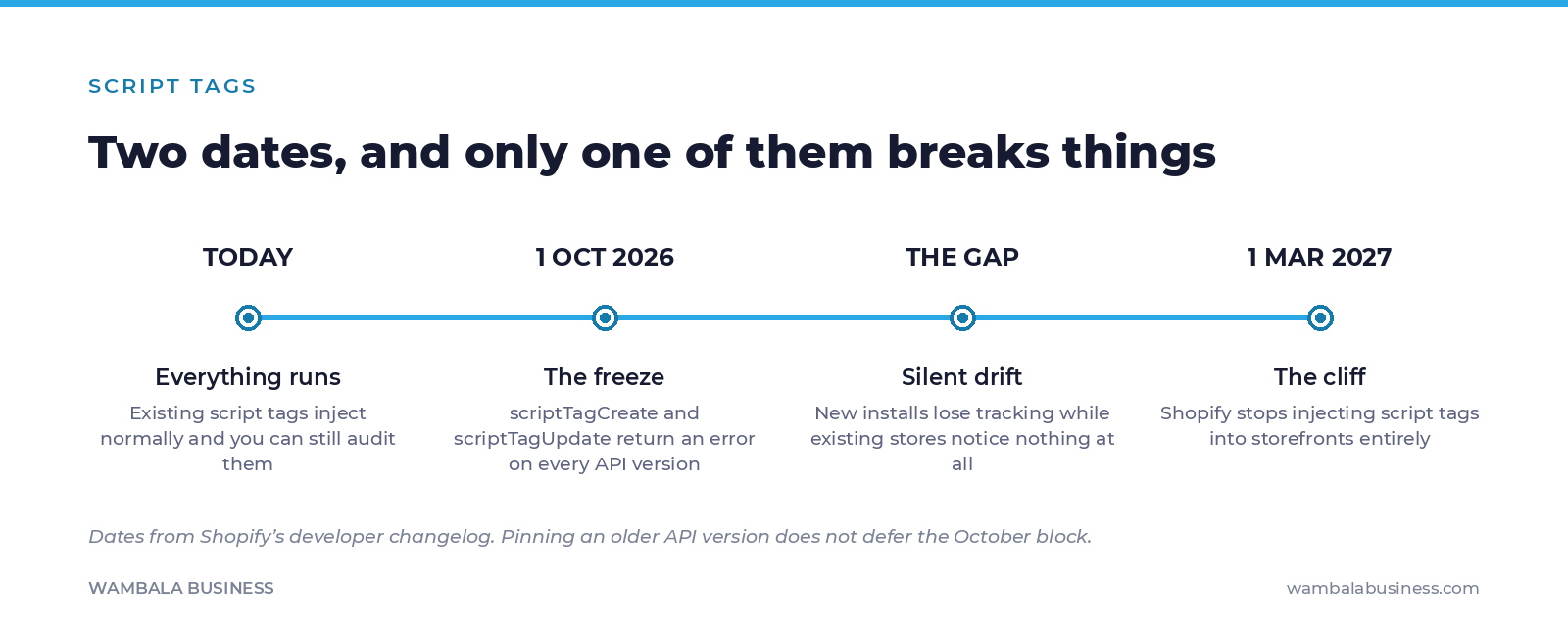
From October 1, an app that still relies on the legacy API simply cannot install its tracking on a new store. Your existing stores carry on. Your newest store, or a store you reinstall an app on, quietly ships without the pixel it thinks it has.
Nobody gets an alert. Conversions just come in lower than they should, and the first instinct is to blame the campaign.
What exactly stops on October 1
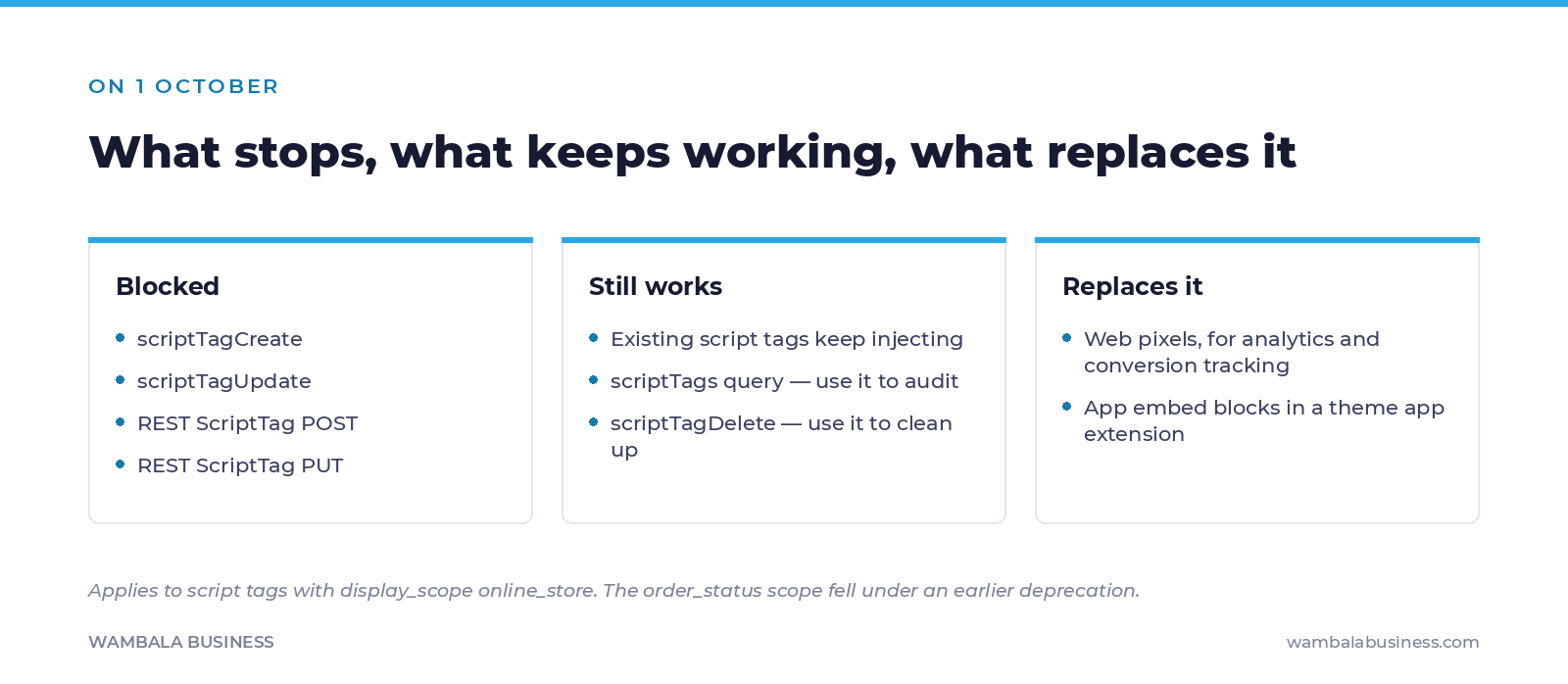
scriptTags and scriptTagDelete survive on purpose — Shopify left you the tools to audit and clean up, which is the whole job between now and March.Two details that change how you plan this:
Pinning an older API version does not help. Shopify is explicit: “The deprecation applies to all API versions, including older ones, so pinning won’t defer it.” If a vendor tells you they are on an older version and therefore fine, that is not accurate.
Scope matters. This deprecation covers script tags with a display_scope of online_store. Script tags scoped to order_status fell under a separate, earlier deprecation — so a store can be affected by one, the other, or both.
The gap Shopify has acknowledged and not solved
This is the part worth knowing before you assume your apps will handle it.
The replacement paths are web pixels for analytics and conversion tracking, and app embed blocks in a theme app extension for general JavaScript. Web pixels are the clean path: Shopify’s documentation notes they require no merchant action.
App embed blocks are not. In Shopify’s own developer forum, a staff member acknowledged that “there’s no programmatic way to enable them for existing users.” An app can ship the embed block; somebody still has to switch it on in the theme editor, store by store.
Read that as an operator. It means a correctly updated app, installed on your store, can still end up not running — because the block was never enabled. Developers in that thread raised exactly this concern about merchants who will never manually migrate, and Shopify has not published a resolution. Do not assume "the app updated" equals "the tracking works."
The audit, which is free and takes an afternoon
The useful thing about this deadline is that Shopify deliberately left the inspection tools alive. You do not need to guess.
- List what you actually have. The
scriptTagsquery still works. Run it and you get the real inventory of legacy script tags on your store — not what you remember installing, what is actually there. - Match each one to an app or a person. Anything you cannot attribute is a candidate for deletion, not migration.
scriptTagDeletestill works too. - Ask each ad-platform app which path it took. Web pixel, app embed block, or still on script tags. If it is an app embed block, ask the second question: is it enabled on my theme right now?
- Check the tracking end to end, not the settings screen. Place a real test order and confirm the
Purchaseevent arrives where it should. A settings page that says “connected” has never been evidence. - Write down the date you checked. You will be doing this again after the next theme change.
This is the same discipline we apply to every account before we spend a peso on it: the pixel and the Conversions API guide covers the deduplication half of the same problem, in Spanish.
Why this matters more than it looks
Tracking failures are the most expensive kind of silent bug in e-commerce, because the platform keeps optimizing on whatever it can see.
If your Purchase events stop arriving in March and nobody notices for three weeks, Meta does not pause your campaign. It keeps spending, optimizing toward the events it still receives, and quietly gets worse at finding buyers. The invoice looks normal. The results do not.
This is the reason we do not run paid traffic on stores whose measurement we have not verified ourselves. It is not a policy we invented to be difficult — it is that the alternative is paying for decisions made on data nobody checked.
What nobody can tell you
We cannot tell you which of your apps are compliant. Nobody can, from outside your store: it depends on the exact app versions installed, your theme, and whether somebody enabled the embed blocks. Any article that hands you a list of “safe apps” is guessing.
What is verifiable is the timeline, the scope, and the fact that the inspection tools still work today. That is enough to stop wondering and go look.
If you want us to run that audit with you and tell you straight what is going to break, the first round of our technical audit is free. If you would rather have the measurement built properly from the start, that is how we build Shopify stores and how we run Meta Ads on top of it.
Verified September 22, 2026. Dates, quotes and scope come from Shopify’s developer changelog and developer community forum.
Sources: Shopify — Script tags are deprecated and will stop running on March 1, 2027 · Shopify Developer Community — deprecation thread
Forty-eight hours, everything public about your brand, zero sales deck.
Leave your email and we will send you the report. We tell you what we find, whether or not it leads to hiring us.
The signup form needs marketing cookies, which you have not accepted yet. You can enable them from the cookie notice, or simply write to us: